


XYRCOS Research Laser
Description
The XYRCOS DTS (dynamic targeting system) moveable research laser and the XYRCOS and XYClone fixed research lasers are for use in developmental biology procedures:
- Assisted Hatching
- Cloning/SCNT (Somatic Cell Nuclear Transfer)
- Cell and Tissue Ablation
- Embryo biopsy (trophectoderm, blastomere)
- Inner Cell (ICM) Isolation
- Embryonic Stem (ES) Cell Injection
Features
Dynamic Moveable Laser
Select different laser paths to match the shape of the zona’s outer layer and perform fast and easy cell separation:

- Single shot: click any single point on screen to fire.
- Line / curve: draw a straight line of any length and then select and drag to create a curve.
- Freehand: draw any freeform path by clicking and dragging.
- Multipoint: click up to 25 non-connected locations to apply laser. Each point may have a different laser setting.
- Rectangle: click and drag to draw a rectangle of any proportion.
- Circular Arc: A circle arc (part or segment of the circumference of a circle) may be drawn and edited as needed.
Specifications
| Laser | 1460 nm, Infrared Solid-State Diode, Class 1 laser product 40x objective (XYRCOS DTS), 20x objective (XYRCOS and XYClone) Compatible with most inverted microscopes |
| Laser Power | 300 mW |
| Laser Modes and Pulse Duration |
Adjustable pulse length determines size of ablated area Single mode: 1 – 3000 μs Double mode: 1 – 3000 μs Staccato mode: Pulse length : 1 – 3000 μs, 90mW mean power CW (optional): Allows non-pulsed laser application over a long duration of time. Maximum power: 30%, Maximum Total Duration: 60 seconds |
| Laser unit dimensions (HxWxD) | XYRCOS® DTS: 42mm x 34mm x 34mm XYRCOS: 42mm x 32mm x 32mm |
| PC System Requirements | Windows desktop or Laptop Operating systems: Windows 7, Windows 8, Windows 10, Windows 11 |
| Power Requirements | Operating Voltage (power supply) 100 – 240 VAC RMS |
Software
These lasers come equipped with the user-friendly HT Laser 6 software.
Clean and intuitive design with modernised software interface. Quick-select between laser modes and objectives for maximum efficiency. Review captured images and videos in the gallery.
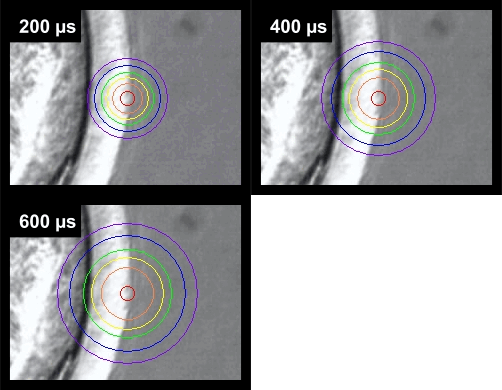
Isotherm Rings for Temperature Indication
The Isotherm Rings appear on the screen as a series of six concentric circles of varying colors. This safety feature indicates the drill hole size and the maximum temperature reached at the ring diameter. The Isotherm Rings automatically adjust for every power and pulse time combination.
High Resolution Digital Camera
View embryos in full screen and enhanced resolution with the integrated digital camera.
Integrated Database
Store sample details and images to database. Improve workflow with the ability to quickly select sample information for future procedures.